Attack graph notation
An attack graph shows how an attack unfolded: what the attacker needed, what they did, and what each step gave them. This guide explains every part of the notation used by the Attack Graph Builder, with examples you can open and change.
1. The parts of a graph
Every attack graph is built from two kinds of box that alternate: conditions, which are states of affairs, and events, which are things that happen. An event needs certain conditions to be true, and when it happens it makes new conditions true. Those new conditions let the next event happen, and so on until the attacker reaches their goal.
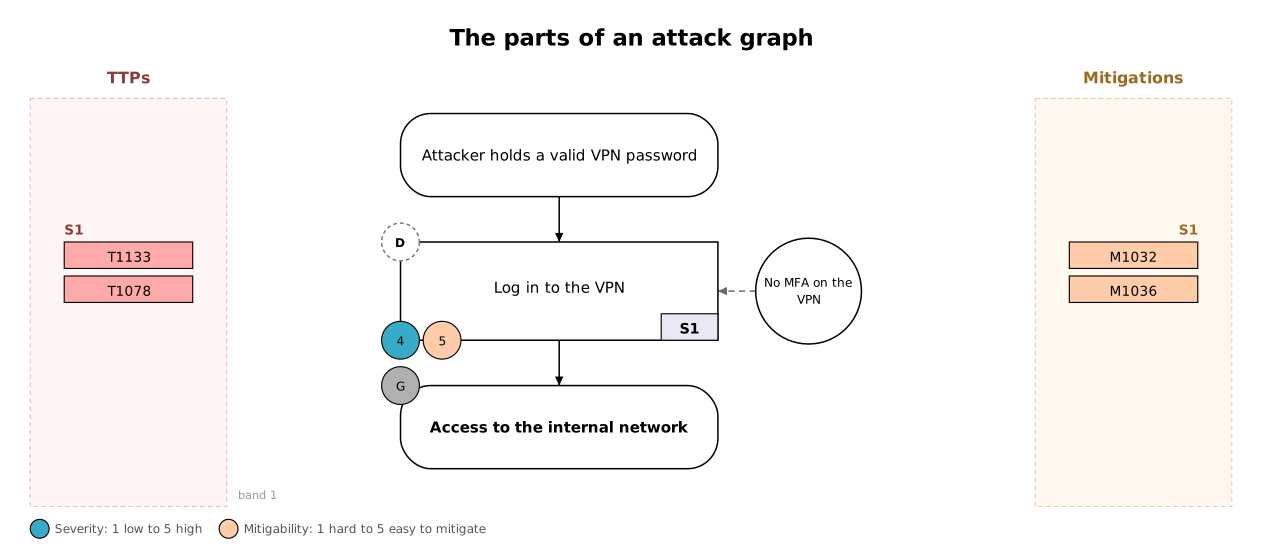
| Part | How it's drawn | What it means |
|---|---|---|
| Precondition | Rounded box | A state that must already hold for the next event to happen, such as "Attacker holds a valid VPN password". It's a status, not an action, so it never has TTPs or mitigations. |
| Event | Square-cornered box | Something the attacker does, or something that happens, such as "Log in to the VPN". Events carry the ATT&CK codes, the scores and a step tag (S1, S2 …) in the bottom-right corner. |
| Postcondition | Rounded box | The state an event leads to. It's drawn the same way as a precondition, because it becomes the precondition of the next step. |
| Goal | Rounded box, bold text, grey G marker | The attacker's objective: the final postcondition. |
| Enabler | Circle with a dashed grey arrow | A factor that made an event easier or its impact worse, such as "No MFA on the VPN". The event could still happen without it: an enabler is never required. |
| Phase (optional) | Letter in a dashed circle on the event's top-left corner | The Cyber Kill Chain stage: Reconnaissance, Weaponisation, Delivery, Exploitation, Installation, Command and control, or Actions on objectives. |
2. Joining steps: AND and OR
When an event depends on more than one condition, the graph shows whether it needed all of them or just one.
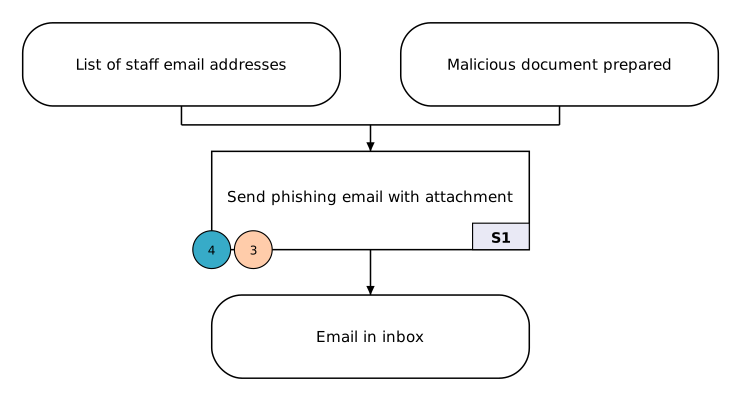
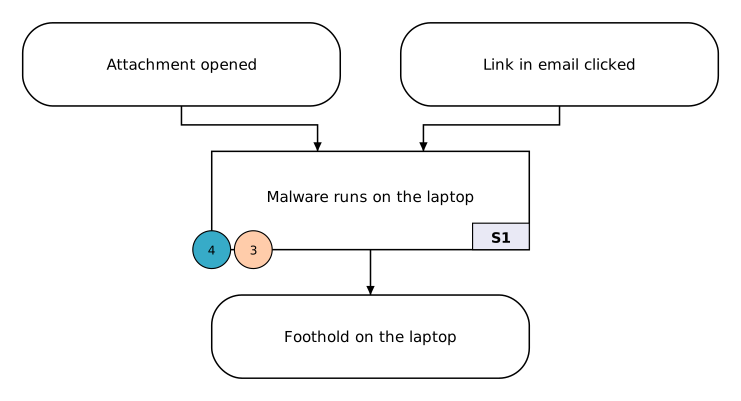
One event can use AND or OR, but not both. If a step needed "A and either B or C", split it: make an intermediate condition for "B or C", or rethink which conditions really mattered.
3. Showing uncertainty
Evidence about real attacks is often incomplete. When you believe something happened but can't show it, draw it with a dotted line. The same dotted style is used everywhere: for conditions, events, the arrows into and out of them, and the TTP and mitigation codes of an uncertain event.
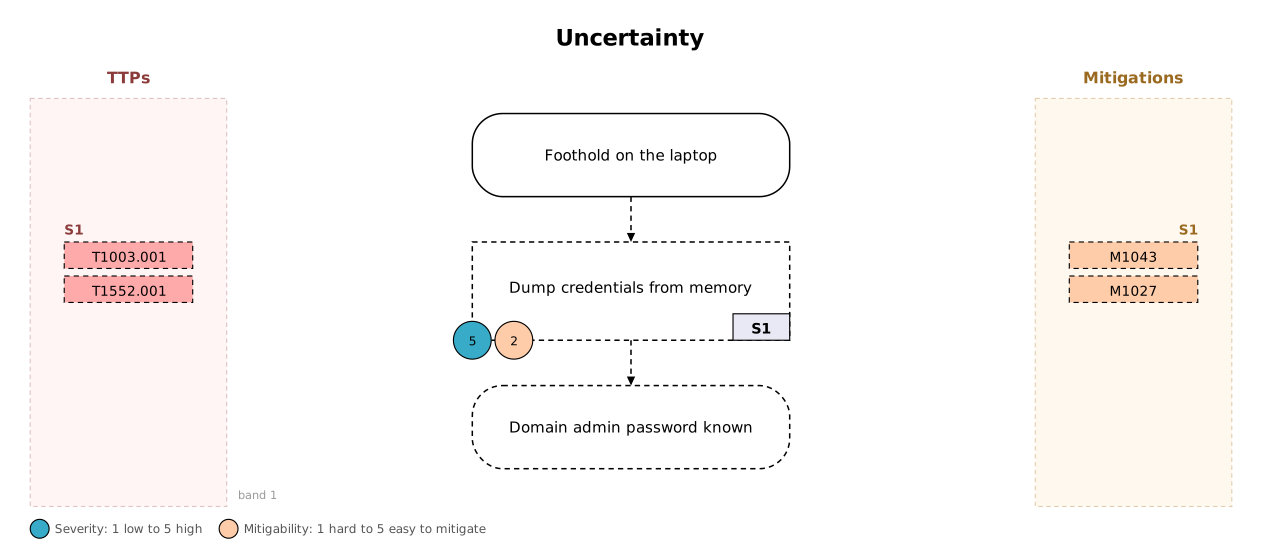
If the event itself is certain but you're unsure about one technique, mark just that code by adding ? after it, e.g. T1056.001?. Whenever you mark something uncertain, say in your write-up why you think it happened.
4. Severity and mitigability
Each event carries two scores from 1 to 5, drawn as circles on its bottom-left corner:
- Severity: how much the step advanced the attack or how much harm it did. 1 is low, 5 is high.
- Mitigability: how easily the step could have been prevented or stopped. 1 is hard to mitigate, 5 is easy.
The two scales run in opposite directions on purpose. The steps that matter most to a defender have high severity and low mitigability (for example 5 and 1): serious and hard to stop. High severity with high mitigability points to a missed opportunity: a serious step that a simple control would have prevented.
5. TTPs and mitigations
Each event is mapped to MITRE ATT&CK. The codes sit in two margins rather than on the boxes, so any number of them fit without cluttering the graph:
- TTPs (tactics, techniques and procedures) go in the left margin. Techniques look like
T1566, and sub-techniques likeT1566.001. - Mitigations go in the right margin, with codes like
M1017.
TTPs describe what the attacker did and mitigations describe how a defender responds, so they sit on opposite sides. Each group of codes is headed by the event's step tag (S1, S2 …) and lined up with the event's row, so the tag tells you which event the codes belong to.
6. Bands and reading order
A graph reads from top to bottom. It's divided into horizontal bands, marked by dashed lines. Each band holds one stage of the attack: the events that became possible at that point, with their preconditions above them and their results below.
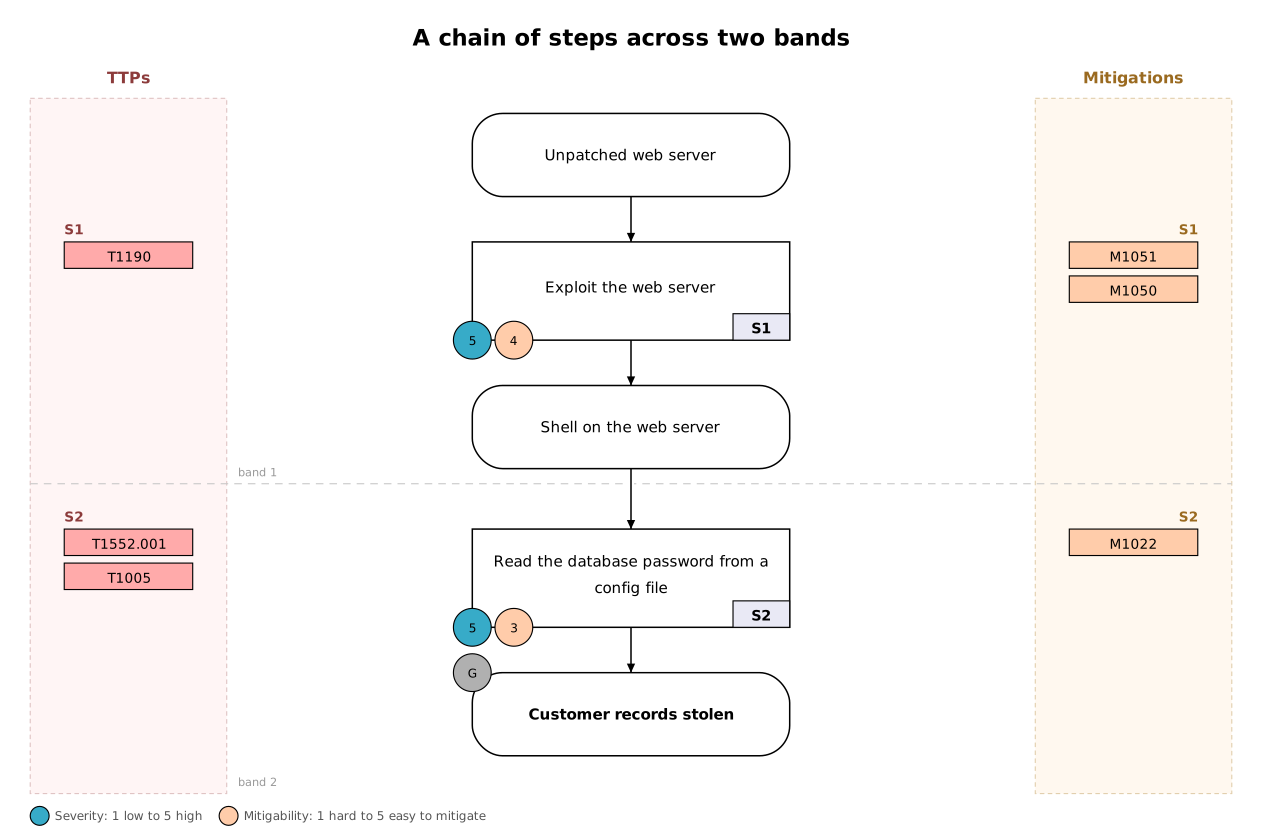
Step tags are numbered band by band, left to right. When events share a band, their codes stack in the margins in the same left-to-right order. More than three events side by side becomes hard to read; if that happens, split the graph into panels.
7. Writing a graph in the builder
In the builder you describe the attack as short statements on the left, and the graph is drawn on the right as you type. You can also add boxes and drag between them on the graph; both views stay in step.
title: Web server breach

condition: Unpatched web server

event: Exploit the web server
  needs: Unpatched web server
  result: Shell on the web server
  helped by: No web application firewall
  ttp: T1190
  mitigation: M1051, M1050
  severity: 5
  mitigability: 4
phase: E| Statement | Meaning |
|---|---|
title: / subtitle: | The heading printed at the top of the graph. |
condition: | A precondition that exists before any event produces it. |
event: | An event. The lines below it, indented by two spaces, describe it. |
needs: | The conditions the event needed, joined with AND or OR (not both). They must match the wording of a condition: or an earlier result:. |
result: | The condition the event led to. Later events can name it in their needs:. An event can have more than one result. |
helped by: | An enabler for this event. |
ttp: / mitigation: | ATT&CK codes, separated by commas. Add ? after a code to mark it uncertain. |
severity: / mitigability: | Whole numbers from 1 to 5. |
phase: | One letter: R, W, D, E, I, C or A. |
(uncertain) / (goal) | Written after a description to mark it uncertain, or as the goal. |
# … | A note to yourself. It isn't drawn. |
Wording is how statements link together: needs: Shell on the web server connects to whichever event has result: Shell on the web server. Capital letters and extra spaces don't matter, but spelling does. If a name doesn't match, the builder suggests the closest one.
8. Common mistakes
The builder checks the notation as you write and lists anything wrong below the statements. The most common problems:
- Codes on a condition. Conditions are states, not actions, so TTPs and mitigations belong on the event that follows or caused them.
- Linking two events directly. Events always connect through a condition: give the first event a
result:and name it in the next event'sneeds:. - Mixing AND and OR on one
needs:line. See section 2. - An event with no
needs:. Every event depended on something, even if it's only "Attacker has internet access". - No goal. Mark the attacker's final objective with
(goal). - Missing scores or codes. Every event should have severity, mitigability, at least one TTP and at least one mitigation.
- Code in the wrong line. Codes starting with T go on
ttp:, codes starting with M onmitigation:. - Loops. An event can't need its own result, directly or through later steps.
Errors must be fixed before the graph is correct. Warnings are reminders; a graph can be drawn with them, but a finished one shouldn't have any.
9. Worked example
This graph models a phishing attack that ends in credential theft through a malicious browser extension.
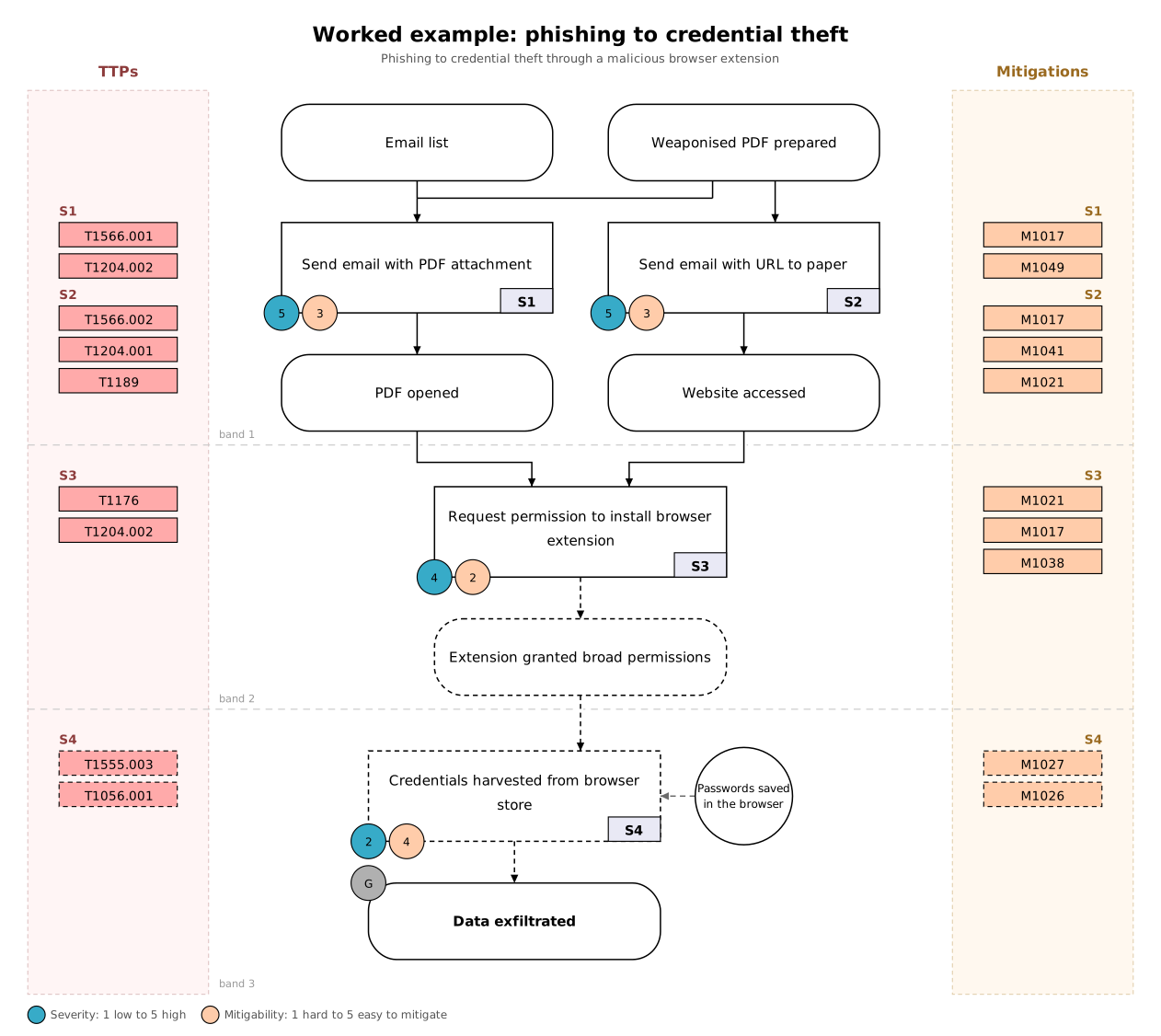
- Band 1: delivery. The attacker starts with two preconditions: a list of email addresses and a weaponised PDF. S1, sending the email with the PDF attached, needed both, so they're joined with AND. S2 is a second route: an email with a link. Each event has its own result: "PDF opened" and "Website accessed".
- Band 2: installation. S3, the request to install a browser extension, could follow from either route, so its two arrows stay apart: OR. Its result, "Extension granted broad permissions", is dotted because the investigation couldn't confirm what the extension was allowed to do.
- Band 3: objective. S4, harvesting credentials from the browser, is itself uncertain, so the event, its arrows and its codes are all dotted. Saved browser passwords made it easier, so they appear as an enabler. It leads to the goal, "Data exfiltrated", marked with G.
- Scores. S1 and S2 are high severity (5) with moderate mitigability (3): user training and filtering could have helped. S3 is harder to mitigate (2). S4 has low severity (2) and high mitigability (4), because good password practice would have limited it.
10. Further reading
- MITRE ATT&CK: the knowledge base of adversary techniques and mitigations used for the codes.
- Lallie, H. S., Debattista, K. and Bal, J. (2020) "A review of attack graph and attack tree visual syntax in cyber security". Computer Science Review, 35, 100219.