QUIETPIVOT digs in
Model the internal recon, the escalation and the two persistence steps. Find the missed patch.
Course › Lesson 5 of 7
Installation is where an attacker who has a foothold digs in: they raise their privileges and set up ways to keep access. In the Westfield case study, this is Incident 2, where QUIETPIVOT escalated through an unpatched flaw and planted persistence. It's also where the university's own missed patch, not any public exposure, opened the door.
The case study. This lesson uses the University of Westfield master case study from Cyber Security Fundamentals. If you've followed the earlier lessons you'll recognise the attack; each lesson looks at one stage of it.
Installation covers gaining more control and making the access durable. It spans three ATT&CK tactics: Privilege Escalation (getting higher rights), Persistence (keeping access), and Defense Evasion (avoiding notice). Often the attacker also does Discovery first, looking around from the inside.
QUIETPIVOT bought a stolen credential and, from that one Finance and HR account, explored the SAP ERP system from inside, then exploited a critical privilege-escalation flaw, a February 2025 vendor patch Westfield hadn't applied, to gain administrative rights. They created a scheduled task to keep re-establishing contact, and added a mailbox forwarding rule so internal mail stayed visible even if the password were reset.
| Code | Technique | In this case study |
|---|---|---|
T1087 | Account Discovery | Mapping accounts from inside |
T1082 | System Information Discovery | Finding other named systems |
T1068 | Exploitation for Privilege Escalation | Exploiting the unpatched SAP flaw |
T1053.005 | Scheduled Task/Job: Scheduled Task | The scheduled task for persistence |
T1114.003 | Email Collection: Email Forwarding Rule | The mailbox forwarding rule |
Hover over any code in the builder to see ATT&CK's own description.
This stage is where the defender has the most control, and where Westfield fell short. For T1068, ATT&CK lists M1051 Update Software: the February patch existed and would have prevented the escalation outright. For the scheduled task and forwarding rule, ATT&CK lists M1018 User Account Management and M1047 Audit; alerting on new scheduled tasks and mail-forwarding rules is how these are caught. Unlike reconnaissance, this is squarely inside the university's own control, so mitigability is high.
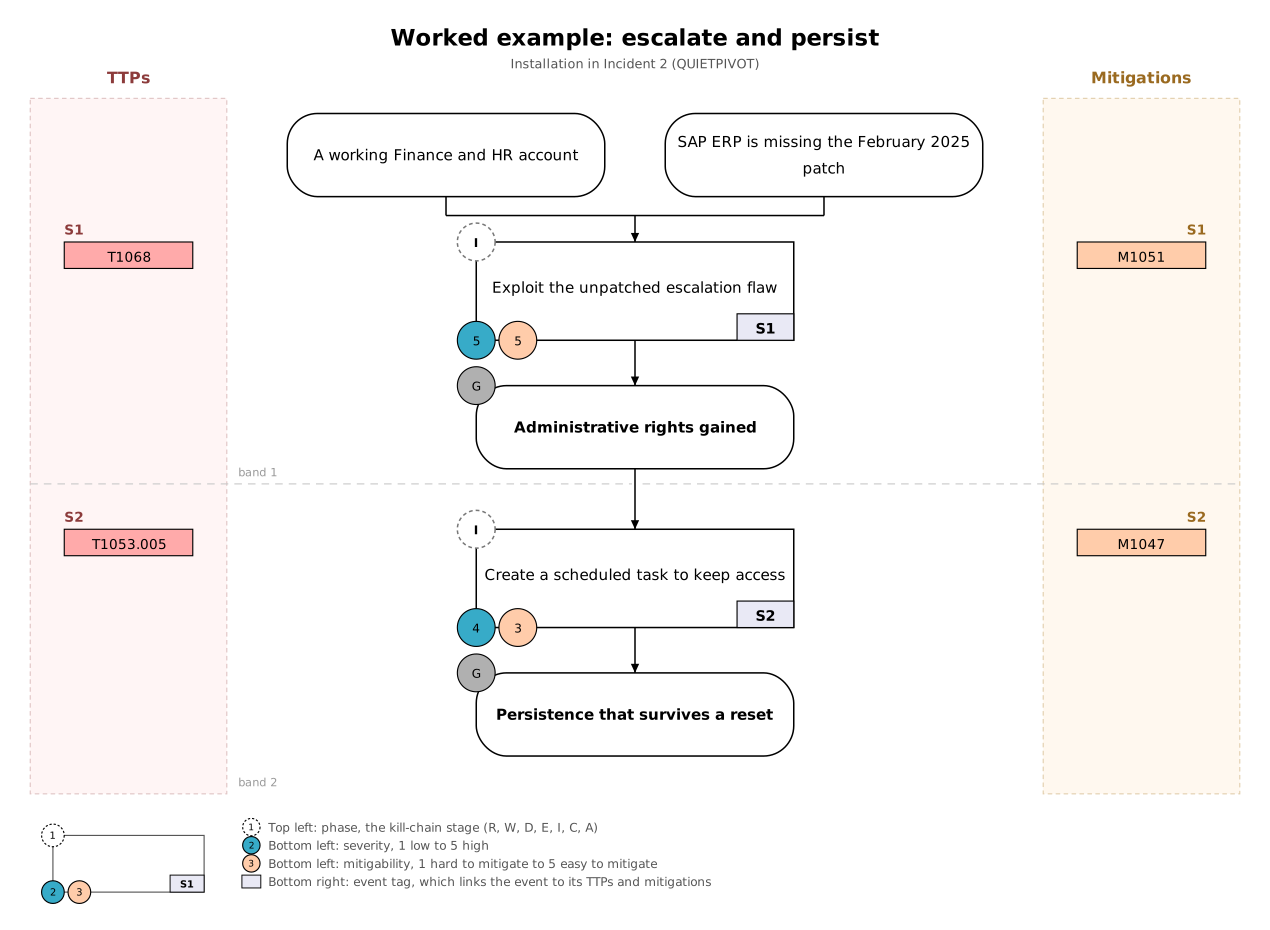
Each task opens in the builder with the scenario beside your graph. Build your graph, press Check my graph for feedback as often as you like, then compare with the model answer. Your work on each task is saved in your browser.
Model the internal recon, the escalation and the two persistence steps. Find the missed patch.
Map the different ways an attacker could keep access even after a password reset.
When you've finished, you can send your graph and its activity log to your tutor with Email to tutor in the builder.