The phishing wave
Model the sending of the email and the click that followed.
Course › Lesson 3 of 7
Delivery is the moment the attack reaches the target and someone acts on it. In MITRE ATT&CK this is the Initial Access tactic. It's the first stage where the defender's controls can really bite. In the Westfield case study, it's the phishing wave of 3 May 2025.
The case study. This lesson uses the University of Westfield master case study from Cyber Security Fundamentals. If you've followed the earlier lessons you'll recognise the attack; each lesson looks at one stage of it.
Delivery is transmitting the attack to the target and getting the first action: a click, an opened attachment, a login on a fake page. It's the third stage of the Cyber Kill Chain and maps to ATT&CK's Initial Access tactic.
Unlike reconnaissance and weaponisation, delivery reaches the target's environment, so mail filtering, web-content controls, user training and monitoring all have something to catch.
On 3 May 2025, LedgerWraith emailed staff claiming that, after a cyber attack, everyone had to reset their SAP ERP credentials, with a link to the fake reset page. Staff who believed it clicked and reached the fake login page. The story was believable partly because the real portal had no MFA, so a forced reset sounded plausible.
| Code | Technique | In this case study |
|---|---|---|
T1566.002 | Phishing: Spearphishing Link | The mass reset email with a link |
T1204.001 | User Execution: Malicious Link | A staff member clicking the link |
T1133 | External Remote Services | (Task B) logging in to remote access |
T1190 | Exploit Public-Facing Application | (Task B) hitting the legacy OpenVPN gateway |
T1199 | Trusted Relationship | (Task B) using a partner's access |
Hover over any code in the builder to see ATT&CK's own description.
Delivery is where defence starts to work. For spearphishing links, ATT&CK lists M1017 User Training, M1021 Restrict Web-Based Content and M1031 Network Intrusion Prevention, among others. Mail filtering blocks many messages before they arrive; user training helps staff spot the ones that get through; blocking the link stops the click from mattering. The broader lesson: an organisation's weakest way in sets its risk, so every route has to be covered.
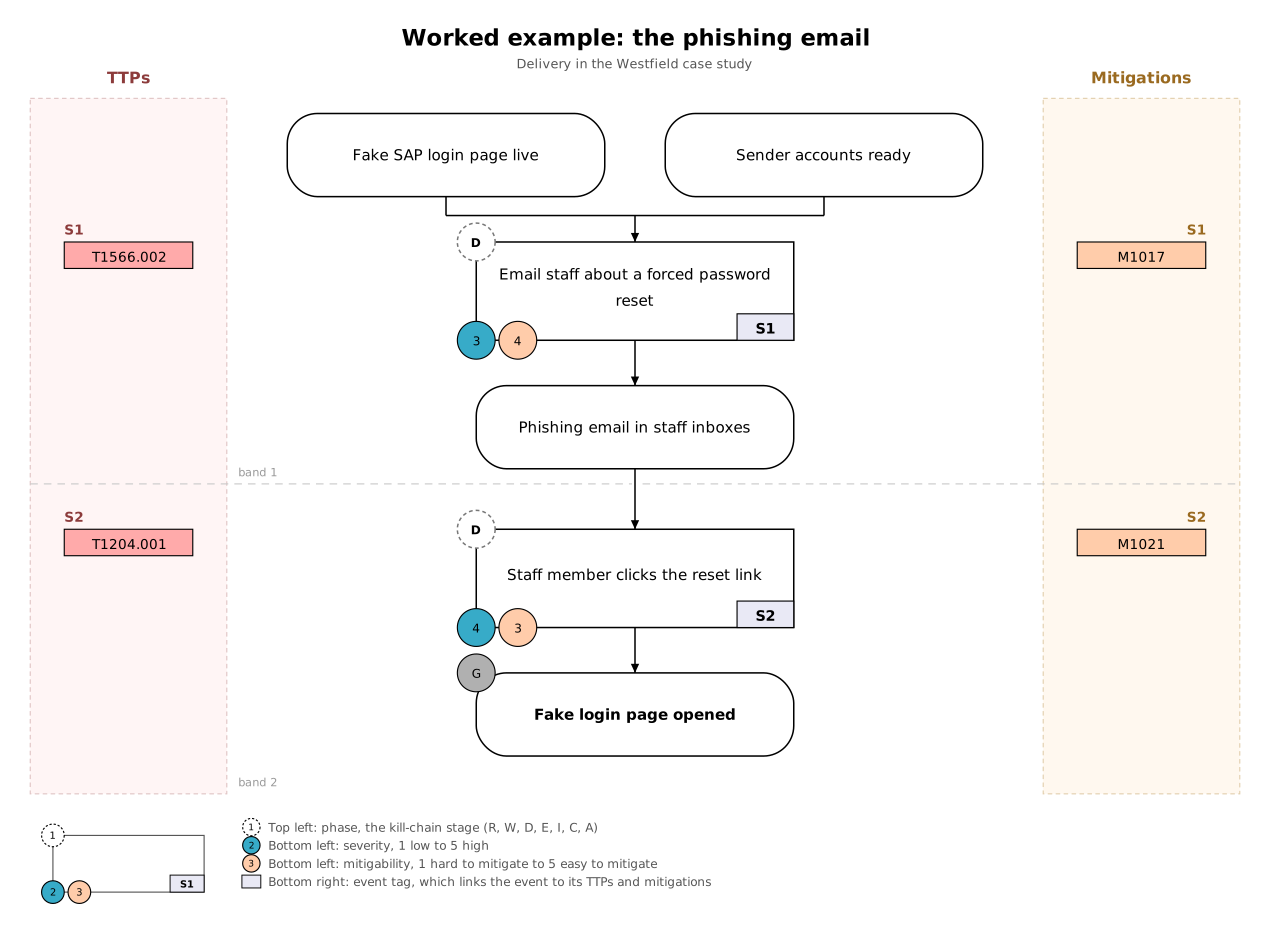
Each task opens in the builder with the scenario beside your graph. Build your graph, press Check my graph for feedback as often as you like, then compare with the model answer. Your work on each task is saved in your browser.
Model the sending of the email and the click that followed.
Map the different ways an attacker could get a first foothold at Westfield.
When you've finished, you can send your graph and its activity log to your tutor with Email to tutor in the builder.